
Key takeaways
- Make every submission understandable without a separate demonstration call.
- State what changed, how to review it and which limitations remain.
- Use synthetic evidence and keep secrets out of delivery attachments.
A software delivery should tell the client what is ready, how to review it and which decision you need. An attachment called final.png and a summary saying done leave too much work for the reviewer. Clear instructions make the review useful even when the developer is unavailable.
This guide focuses on the submission itself, after the stage work has been completed. It uses a fictional request-management feature to explain the preparation. It does not treat a screenshot as proof that the whole application works or that the client has accepted it.
Begin with the stage's agreed outcome
Read the scope and expected deliverables before writing the submission. Identify the behaviours the client agreed to review at this point. If the stage covers request approval, the summary should explain that flow rather than list every code change made during development.
Mention the version being submitted. A version gives the discussion a stable reference when the client later asks what changed. Avoid replacing an earlier attachment without explanation and then expecting reviewers to remember which screen or document they saw previously.
Write a useful opening summary
A good summary can begin with the completed outcome: the reviewer queue now shows pending requests, and an authorized reviewer can approve or return a request with a comment. This tells the client what they are reviewing before they inspect any evidence.
Follow with the scope boundary. If reporting is scheduled for another stage, say so briefly. A reviewer who sees no report should understand whether it is missing from this delivery or intentionally outside the current milestone. That distinction prevents unnecessary correction cycles.
Give the client an exact review path
Describe the starting point, the account role and the action to take. For example, open the review environment as an employer, select the sample request and inspect the attached evidence. The instructions should match the reviewer's permissions rather than depend on administrative access.
Use synthetic records whose purpose is clear. A sample called Review example 01 is easier to discuss than a real customer's record copied into a demonstration. Explain which sample should succeed and which intentionally illustrates an incomplete request or a validation message.
After the action, state the expected result. The reviewer should know that approval changes the request status and adds a decision to its history. Without an expected result, they may click through the application successfully but still be uncertain what they are meant to accept.
Cover a correction path as well
Include one relevant correction scenario when the stage supports it. Ask the reviewer to return an incomplete request with a comment and check where the requester sees that comment. This demonstrates the business conversation around an exception, not only the easiest path through the screen.
Keep the exercise manageable. A stage delivery is not the place to paste a large internal test log without guidance. Choose review steps that connect directly to acceptance criteria, and place supporting technical detail in a separate reference when the client needs it.
Attach evidence that supports the decision
Choose evidence according to the claim. A screenshot can show layout and visible values. A short written scenario can explain an interaction. A review environment lets the client exercise behaviour. None of those alone proves that every permission, integration or failure case has been addressed.
Stageflow's delivery form accepts an optional deliverable attachment and allows the summary to refer to files already shared in the project. Use a descriptive filename with a version or date where helpful. A consistent name makes later discussion easier without relying on attachment order.
For the current upload control, prepare a supported PDF, PNG or JPEG within the stated size limit. Do not rename an unsupported file extension to bypass the form. If a deliverable needs another transfer method, agree an appropriate controlled location and describe it in the submission.
Remove material the reviewer does not need
Check screenshots for private customer information, account identifiers and unrelated browser tabs. Do not include passwords, access tokens or environment files in a delivery attachment. The client needs evidence of the work, while account setup and secret transfer require separate appropriate handling.
For a document, inspect the actual exported file before attaching it. A source document and its export can differ in page layout or missing images. Make sure the version the client receives contains the material referenced by the summary and opens in the intended format.
State limitations without obscuring readiness
A useful limitation is specific: the demonstration uses sample records and the production import is scheduled for a later stage. It tells the client how to interpret the evidence. A vague statement such as some things may not work leaves the review boundary unclear.
Distinguish an accepted exclusion from an unresolved defect. An exclusion belongs to the agreed scope. A defect contradicts an expected behaviour and may prevent acceptance. Do not describe an incomplete required feature as a limitation merely to move the stage into payment.
If an important dependency is unavailable, explain how that affects review. A demonstration using a simulated response cannot establish that a live external service is connected. Label the substitution and agree whether acceptance should wait for the dependency or cover a narrower result.
Submit once the package is coherent
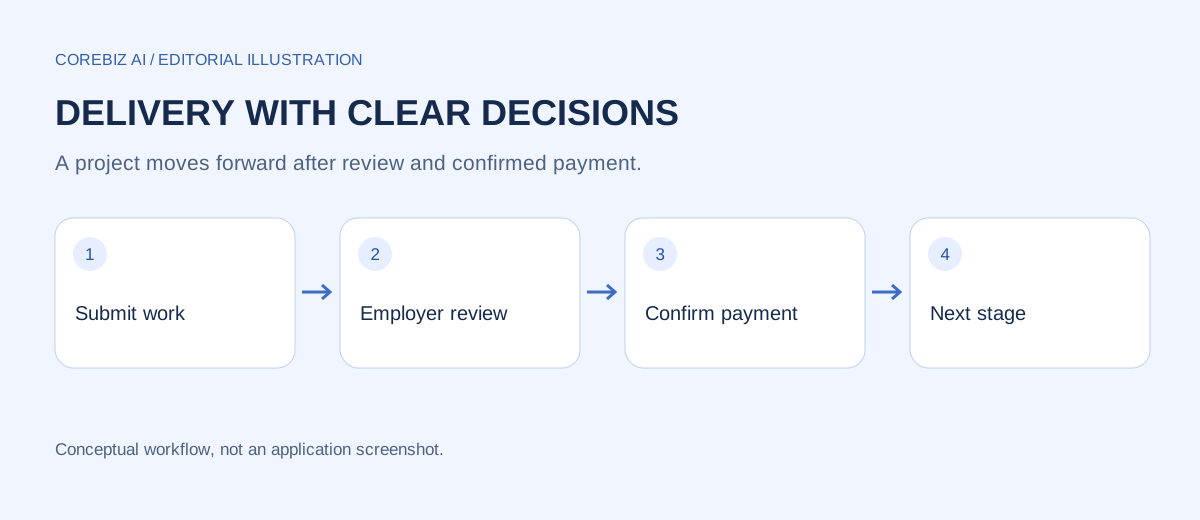
In Stageflow, the administrator starts a ready stage, completes the work and uses Submit work to send a delivery for employer review. The delivery includes the summary and any selected supporting file. The employer then reviews that version and chooses approval or a revision request.
The administrator should read the summary as if seeing the project for the first time. Check whether the reviewer can find the starting point, understand the expected result and identify remaining questions. This small editorial step can reveal missing instructions without introducing more documentation than the task needs.
After submission, keep discussion attached to the project context. If a call produces an important clarification, summarize the decision in the workspace. Otherwise, the delivery history may show an approval without preserving the reasoning that made the acceptance understandable.
Follow the review decision through to payment
Approval in the current Stageflow workflow makes the stage payment available. It does not itself mean the payment was received. The client submits payment evidence, and confirmation completes the stage and unlocks the next one. Keep those actions separate when explaining progress to the client.
If the employer requests a revision, respond to the actual comments and submit a new delivery version. A revised package should explain what changed from the previous version. Reusing the original summary unchanged forces the reviewer to rediscover the correction and can hide an unresolved issue.
The same preparation routine should continue across later stages. Consistent submission quality makes the history easier to read at handover, when neither party may remember every discussion. Each version should stand on its own as a record of what was offered for review.
Frequently asked questions
Is a screenshot enough for approval?
It depends on the acceptance criterion. A screenshot may support a visual layout decision, but it cannot demonstrate an interactive workflow or access restriction by itself. Give the reviewer a suitable way to examine the behaviour being accepted and label any evidence that has a narrower purpose.
What if the client cannot open the attachment?
Resolve access or file-format problems before asking for a decision. Explain the supported format and provide a readable version through an approved channel. An inaccessible attachment is not a completed review, even if the administrator successfully uploaded it.
Should the developer approve their own submission?
In the Stageflow client workflow, the employer makes the review decision. Internal checks help prepare the submission, but they do not replace the client's acceptance. Keep the reviewer identity and the submitted delivery version clear so the decision has an understandable meaning.
Conclusion
Submit a short outcome summary, exact review steps and evidence matched to the acceptance criteria. Describe limitations honestly and make revisions easy to compare. A client who understands the package can make a specific decision instead of beginning the review by asking what the developer meant.
Explore the project and implementation options
The Stageflow project page explains the available workspace and its access requirements. Use it to compare the process described here with the current application. The automation service page is a starting point for discussing additional workflow requirements; this article does not imply those customizations are already implemented.
Prepared with AI assistance and checked against the project source. Examples are fictional process illustrations, not customer results. GeM Flow is an independent internal workspace, not an official GeM service.
Discuss a focused implementation
Explore the service scope and share the process you want to improve.
Explore this service